

product Details
Explore More
Alternatives
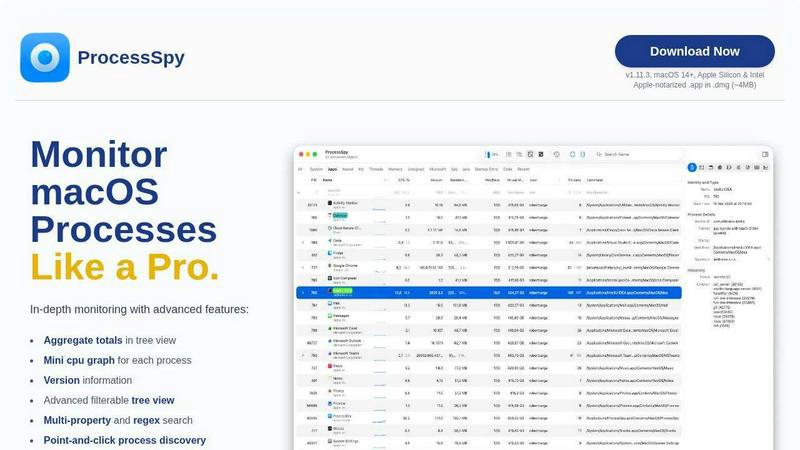
About ProcessSpy
ProcessSpy is a professional-grade process exploration and system monitoring utility designed exclusively for macOS. It serves as a powerful native alternative to tools like Sysinternals Process Explorer for Windows, providing macOS users, particularly developers, system administrators, and power users, with deep visibility into system activity that goes far beyond what the built-in Activity Monitor can offer. The core value proposition of ProcessSpy is its ability to reveal the hidden details of every running process, application, and daemon on your Mac. It visualizes the hierarchical relationship between processes in a detailed tree view, allows for inspection of open files and network connections, and provides critical data like full command-line arguments, version information, and environment variables. This level of detail is essential for debugging complex software, identifying resource hogs, managing dependencies, and terminating unresponsive or malicious processes with precision. Built with a focus on performance and a native Mac experience, ProcessSpy delivers a fast, responsive interface without the bloat of cross-platform frameworks, making it an indispensable tool for anyone who needs to understand exactly what is happening under the hood of their macOS system.
Features
Advanced Hierarchical Process Tree
ProcessSpy presents all system processes in a clear, visual tree structure that shows parent-child relationships, making it easy to understand how applications and services are launched. Beyond simple visualization, this tree view includes aggregate totals for CPU usage, memory consumption, and thread counts for entire branches of processes. This allows you to instantly see the cumulative resource impact of an application and all its helper processes, providing a holistic view of system resource allocation that is impossible to achieve with standard monitoring tools.
Multi-Property and Regex Search
The tool features a powerful, filterable quick-search system that supports searching across multiple process properties simultaneously using regular expressions. For instance, you can search for processes with "java" in the name AND "-Xmx1024m" in their command-line arguments. This granular search capability enables users to pinpoint specific processes with extreme accuracy, saving significant time when diagnosing issues among dozens or hundreds of similar-looking entries in the process list.
JavaScript-Based Advanced Filtering
For ultimate control, ProcessSpy allows users to define custom filters using JavaScript. This feature enables the creation of complex, conditional logic to show or hide processes based on virtually any available property, such as start time, specific entitlements, or memory usage thresholds. This programmatic approach to filtering is a powerful feature for advanced users who need to create highly specific monitoring views for repetitive diagnostic or analysis tasks.
Comprehensive Process Context & Inspection
Right-clicking on any process reveals a context menu packed with actionable insights. You can inspect the open files, network connections, and loaded dynamic libraries (Dylibs) for any selected process. The paid version unlocks even deeper inspection, allowing you to view environment variables, code signatures, entitlements, Info.plist contents, bundle identifiers, and startup context (e.g., launchd daemon or agent). This turns ProcessSpy from a simple viewer into a full-fledged diagnostic suite.
Use Cases
Software Development and Debugging
Developers can use ProcessSpy to debug application launches, inspect the exact command-line arguments and environment variables passed to their software, and verify which dependencies (Dylibs) are loaded. When dealing with multiple runtime versions (like different JDKs for Java), ProcessSpy clearly distinguishes them by showing version information and full paths, eliminating confusion and speeding up the development and testing cycle significantly.
System Performance Analysis and Troubleshooting
When a Mac becomes slow or unresponsive, ProcessSpy is the ideal tool for forensic analysis. Users can quickly identify resource-intensive processes by examining the aggregate CPU and memory totals in the tree view. The ability to see open files and network connections per process helps pinpoint applications that are causing disk I/O or network bottlenecks, leading to faster resolution of performance issues.
Security Auditing and Malware Identification
Security-conscious users and IT professionals can leverage ProcessSpy to audit running processes for suspicious activity. Features like viewing entitlements, signature information, and startup locations (e.g., launch agents) help identify unsigned or inappropriately privileged software. The tool's ability to "remember" finished processes (a paid feature) is invaluable for forensic analysis, allowing review of what was running on the system even after a potentially malicious process has terminated.
Managing and Terminating Stubborn Processes
Unlike the Force Quit function or basic Activity Monitor, ProcessSpy provides authoritative control over processes. It can instantly kill any process, including stubborn background daemons and agents that resist standard termination methods. The visual tree view ensures you can terminate an entire hierarchy of related processes at once, ensuring a clean stop and freeing up system resources completely.
Frequently Asked Questions
Is ProcessSpy safe to install on my Mac?
Yes, ProcessSpy is completely safe. The application is Apple-notarized, meaning it has been checked by Apple for malicious content. It is distributed as a signed .app file inside a .dmg disk image archive, which is the standard and secure method for distributing macOS software. It runs natively and efficiently on both Intel and Apple Silicon Macs.
What versions of macOS does ProcessSpy support?
ProcessSpy is designed for modern versions of macOS. It officially supports macOS 14 (Sonoma) and newer, including the latest releases. The developer specifically notes support for future macOS versions like "macOS 26 Tahoe," indicating a commitment to maintaining compatibility with upcoming Apple operating systems.
What is the difference between the free and paid features?
The free version of ProcessSpy offers robust core functionality, including the advanced process tree, multi-property search, JavaScript filters, basic context menus, and version info viewing. The paid license unlocks advanced diagnostic features such as viewing environment variables, process entitlements, Info.plist data, recording and exporting CPU/memory history (CSV), and the ability to remember details of finished processes for later review.
What is the licensing model for ProcessSpy?
A one-time purchase licenses ProcessSpy for a single user across an unlimited number of their personal devices. This license includes lifetime updates, meaning all future feature additions and compatibility improvements are included at no extra cost. The license is purchased directly through the Gumroad platform.
Similar to ProcessSpy

WidgIq
Provide an AI-powered customer support widget for your website

stackledge
Discover verified SaaS, practical AI tools, and custom n8n workflows on an architecture-first discovery platform built for modern builders.

Product Launch Checklist
A free launch checklist for SaaS, apps, AI tools and more. Every step says why it matters and when you can skip it.

Forms Plugin
The #1 Native Form Builder Plugin for Framer - No Code, No Embeds, No External Platforms.

Chatit Me - Free Random Chat Alternative
Chat with random strangers online for free on ChatIt.me. Enjoy safe, anonymous, and instant 1-on-1 conversations with people worldwide

Xeramail Temp Mail
Free temp mail and temporary email from Xeramail. Get a disposable email address instantly, no sign-up.

Video2URL
Turn videos, images, and files into secure direct links for sharing, embedding, and automated workflows.

VidhyaGen
Fast, free, and privacy-focused online tool to convert image formats instantly without losing quality. Built for web users and creators.