

product Details
Explore More
Alternatives
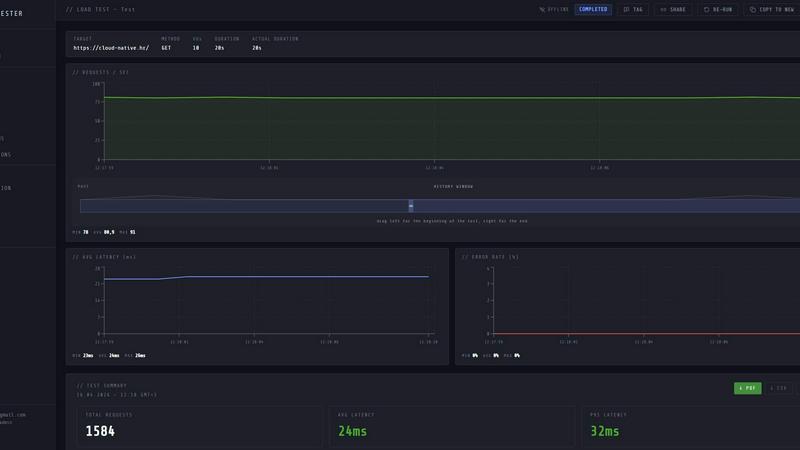
About LoadTester
LoadTester is a modern, cloud-native HTTP and API load testing tool designed by Cloud Native d.o.o. for engineering teams that need repeatable, high-performance performance checks. It eliminates the traditional overhead of setting up and managing load testing infrastructure, allowing developers and QA engineers to focus on results rather than orchestration. With the ability to run distributed load tests directly from a browser or integrate seamlessly into a CI/CD pipeline, LoadTester provides live analytics, including throughput, latency percentiles (p50, p95, p99), and error rates. It supports up to 10,000 virtual users and 10,000 requests per second with a cold start time of under three seconds. The tool includes smart auto-stop based on configured thresholds, run-to-run comparisons to catch performance regressions, scheduled baselines, and comprehensive exports. It is built for teams that want simple, repeatable, and actionable performance testing without provisioning any infrastructure. LoadTester offers a free plan, making it accessible for small projects while scaling to enterprise needs.
Features
Instant Execution with Distributed Workers
LoadTester starts distributed load tests in seconds without any infrastructure setup, worker orchestration, or scheduling headaches. The boot time is under three seconds, workers auto-scale based on demand, and there is zero queue time. Your team focuses on analyzing results while the platform handles worker scaling, infrastructure coordination, and execution flow.
Live Real-Time Analytics
While a test is running, LoadTester streams live telemetry data including requests per second, latency percentiles (p50, p95, p99), active virtual users, and error counts. The live charts update continuously, allowing you to monitor throughput, latency, failures, and bottlenecks as they happen, rather than waiting minutes after the run for logs.
Smart Auto-Stop with Thresholds
Set custom failure or latency thresholds for each test, and LoadTester will automatically stop the test when conditions go sideways. You can configure auto-stop based on p95 latency exceeding a limit, error rate surpassing a percentage, or regression compared to a baseline. This prevents wasted resources and protects your endpoints from prolonged stress.
CI/CD Integration and Webhooks
LoadTester is built for automation with full CI/CD readiness, webhooks, and Slack plus email alerts. You can run tests on every deploy, trigger tests from release pipelines, and send result links to release bots. The tool supports scheduled tests, run-to-run comparisons, and exports in PDF, CSV, and JSON formats for comprehensive reporting.
Use Cases
Pre-Deployment Performance Gates
Engineering teams can integrate LoadTester into their CI/CD pipeline to automatically run a load test before every production deployment. By setting p95 latency and error rate thresholds, the pipeline can block a release if performance degrades beyond acceptable limits. This catches regressions before users notice any slowdown, ensuring consistent application performance.
Spike Testing for E-Commerce Checkout Flows
E-commerce teams can simulate sudden traffic spikes to the checkout endpoint during sales events or product launches. With LoadTester, they can create a test targeting the checkout API at 500 requests per second for five minutes, monitor live latency and error rates, and automatically stop the test if thresholds are breached. This validates that the backend can handle peak demand.
Baseline Monitoring for API Endpoints
QA and SRE teams can schedule daily or weekly baseline tests for critical API endpoints, such as authentication or search. LoadTester runs these tests at consistent rates and compares results against previous runs. If latency increases by more than 15 percent, the tool sends a Slack or email alert, enabling proactive investigation before end users are impacted.
Capacity Planning for New Features
When launching a new feature or microservice, development teams can use LoadTester to determine the maximum throughput and concurrency the service can handle. By running tests with increasing virtual user counts and monitoring p95 latency and error rates, they can identify breaking points and plan appropriate infrastructure scaling.
Pricing
LoadTester offers a free plan that allows you to start running tests immediately without any upfront cost. For detailed information on paid tiers, limits, and enterprise options, please visit the pricing page on the LoadTester website.
Frequently Asked Questions
What infrastructure do I need to set up before using LoadTester?
None. LoadTester is a fully managed, cloud-native service. You do not need to provision any servers, configure load generators, or manage worker nodes. Simply create a test through the browser or API, and the platform automatically scales distributed workers to execute the test.
How fast does a test start after I click run?
Tests typically start in under three seconds from the moment you click run. This includes cold-start time to first request. The platform dispatches workers instantly with zero queue time, so you can launch tests on demand without waiting.
Can I run LoadTester from my CI/CD pipeline?
Yes. LoadTester provides full API access and supports webhooks, making it easy to integrate into any CI/CD pipeline. You can trigger tests, retrieve results, and set pass/fail thresholds that can block a deployment if performance criteria are not met. Slack and email alerts are also supported.
What happens if my test exceeds the set thresholds?
LoadTester features smart auto-stop functionality. If you configure thresholds for p95 latency, error rate, or regression versus a baseline, the test will automatically stop when those thresholds are breached. This prevents unnecessary load on your systems and alerts your team immediately.
Similar to LoadTester


Screen Beaver
Create product videos manually or let your AI agent control Screen Beaver through MCP—no mouse or keyboard needed.


xDevTools
Over 1000 free web tools for developers: formatters, encoders, crypto, finance, images, and more. Runs locally.
AIQualityHQ
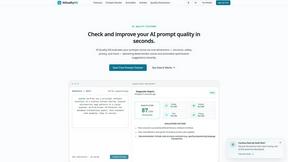
AIQualityHQ instantly analyzes AI prompts across six dimensions to deliver deterministic scores and actionable fixes, all in your browser.

JustLaunched
JustLaunched helps indie makers schedule product launches, reach buyers, and blast across curated SaaS directories.