

Caesura
Caesura is a macOS menu-bar app that reminds you to drink water, stretch, rest your eyes, and breathe on science-backed intervals.
product Details
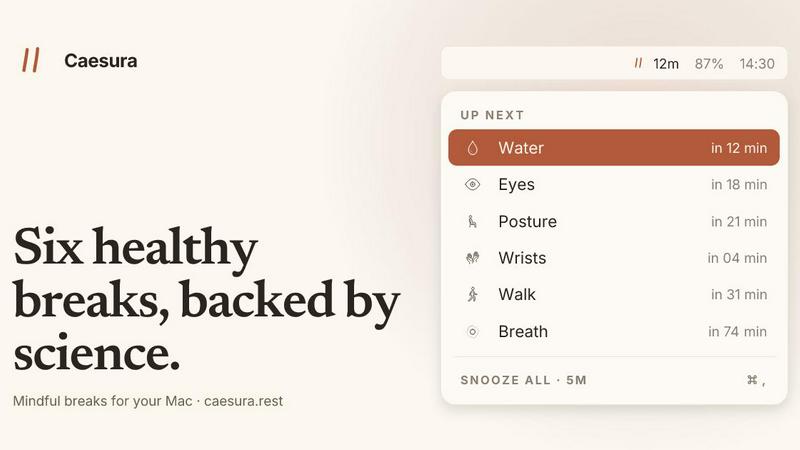
About Caesura
Caesura is a calm, focused macOS menu-bar break manager designed for professionals who spend extended hours at a desk. Unlike noisy, subscription-based wellness apps, Caesura operates quietly in the background, delivering evidence-based reminders for six essential habits: drinking water, walking, stretching your wrists, resting your eyes, checking your posture, and breathing. Each reminder runs on its own independent schedule, derived from peer-reviewed research rather than arbitrary round numbers. The core innovation is coalescing: when two reminders fall within one minute of each other, they merge into a single, gentle prompt, ensuring you are never interrupted twice in a row. Caesura respects your workflow by automatically pausing all timers during video calls, screen sharing, fullscreen apps, Do Not Disturb mode, calendar events, and games, resuming exactly where it left off. The application requires no account creation, no credit card for the trial, and no telemetry, making it a private, clutter-free tool. It offers three distinct prompt styles per break, from a full-screen overlay for habits you might ignore to a silent notification for lighter nudges. With a one-time purchase price of $15 and a 14-day free trial, Caesura is built for developers, designers, writers, remote workers, and anyone who values sustained focus alongside physical health, providing timely nudges that keep you healthy without breaking your concentration.
Features
Six Science-Backed Breaks
Caesura delivers six distinct reminders, each on an interval supported by peer-reviewed studies rather than arbitrary numbers. Water every 45 minutes, walk every 60 minutes, wrists every 30 minutes, eyes every 20 minutes, posture every 30 minutes, and breathing every 90 minutes. Each break includes a link to the underlying research, allowing you to verify the evidence. You can independently enable, disable, or adjust the interval for any break, tailoring the system to your personal needs and schedule.
Coalescing of Reminders
When two or more break reminders fall due within one minute of each other, Caesura automatically merges them into a single, unified prompt. This prevents the frustration of back-to-back interruptions that disrupt your flow. Instead of seeing separate notifications for water and posture, you receive one gentle break that covers both habits. This intelligent coalescing ensures you maintain healthy routines without sacrificing productivity or experiencing notification fatigue.
Automatic Pause and Resume
Caesura intelligently monitors your computer activity and pauses all timers when you are busy. It detects video calls, screen sharing, fullscreen applications, Do Not Disturb mode, calendar events, games, and FaceTime in the foreground. When any of these activities are active, every timer freezes and resumes exactly where it left off. If you had 12 minutes remaining until a water reminder, you still have 12 minutes after the call ends. This ensures you never receive a distracting nudge during critical work moments.
Customizable Prompt Styles
Each of the six breaks can be assigned one of three distinct notification styles, giving you full control over how interruptions appear. Style 01 is a full-screen overlay that pauses all activity until you press Return, ideal for breaks you might otherwise ignore like drinking water. Style 02 is a banner that slides in from under the menu bar and auto-dismisses after 30 seconds, perfect for gentle nudges like eye breaks. Style 03 is a standard macOS notification, the lightest possible touch suitable for posture reminders.
Use Cases
Developer Deep Work Sessions
Software engineers and programmers often spend hours in flow states, coding without breaks. Caesura ensures they maintain physical health by scheduling wrist stretches every 30 minutes to prevent repetitive strain injuries, eye rests every 20 minutes to reduce digital eye strain, and posture checks every 30 minutes to avoid back pain. The coalescing feature merges reminders that fall close together, and the automatic pause during screen sharing or fullscreen coding environments ensures zero disruption during critical debugging sessions.
Remote Worker Wellness
Remote employees working from home often lack the natural movement cues of an office environment, such as walking to a meeting room or getting water from a cooler. Caesura provides structured reminders for walking every 60 minutes, drinking water every 45 minutes, and breathing exercises every 90 minutes. The app pauses during video calls and calendar events, automatically resuming after meetings. The one-time purchase model and absence of accounts make it ideal for privacy-conscious remote workers who want a simple, non-intrusive wellness tool.
Creative Creative Workflows
Designers, writers, and artists who work in fullscreen applications like Figma, Photoshop, or Final Cut Pro benefit from Caesura's automatic pause during fullscreen mode. When they exit fullscreen, the timers resume exactly where they left off. The customizable prompt styles allow creative professionals to assign silent notifications for posture checks while using full overlays for water and walking reminders. The coalescing feature ensures that during intense creative sprints, they receive only one combined break instead of multiple interruptions.
Health-Conscious Students
Students spending long hours studying, reading, or writing papers can use Caesura to maintain physical health without breaking concentration. The eye break every 20 minutes encourages the 20-20-20 rule (look 20 feet away for 20 seconds), reducing eye strain from screens. The breathing exercise every 90 minutes helps manage stress during exam periods. The app pauses during fullscreen study tools and Do Not Disturb mode, ensuring focus is maintained while still receiving essential health reminders at evidence-based intervals.
Pricing
Caesura is available as a one-time purchase for $15. This single payment grants you lifetime access to the application with no recurring fees, no subscriptions, and no hidden costs. You can try the app free for 14 days without providing a credit card or creating an account. The purchase includes all six breaks, coalescing, automatic pause and resume, customizable prompt styles, and all future updates. There are no tiered plans, no premium features locked behind additional payments, and no in-app purchases. The application requires macOS 14 or later.
Frequently Asked Questions
How does Caesura know when I am on a call?
Caesura monitors your Mac's camera, screen sharing status, calendar events, fullscreen applications, Do Not Disturb mode, and which app owns the screen. When it detects any of these active states, all timers automatically freeze. For example, if you start a Zoom call, Caesura pauses every timer and resumes them exactly where they left off after the call ends. This detection happens locally on your machine with no data sent externally, preserving your privacy.
Can I customize the intervals for each break?
Yes, every break has an adjustable interval that you can modify independently. The default intervals are based on peer-reviewed research, but you can shorten or lengthen any reminder to suit your personal needs. You can also completely disable any break you do not want. For example, if you already drink water frequently, you can turn off the water reminder while keeping the walking and posture breaks active. Each break also allows you to choose its notification style from overlay, banner, or notification.
What happens if two breaks are due at the same time?
Caesura intelligently coalesces reminders that fall within one minute of each other into a single, combined prompt. Instead of receiving separate notifications for water and posture, you see one unified break that reminds you to do both. This prevents back-to-back interruptions and maintains your focus. The coalescing is automatic and requires no configuration, ensuring you never experience notification fatigue while still receiving all necessary health reminders.
Is my data private with Caesura?
Caesura requires no account creation, no credit card for the trial, and collects no telemetry or usage data. All detection of calls, screen sharing, and fullscreen apps happens entirely on your local machine. No information is transmitted to external servers. The application is a one-time purchase with no subscription, meaning your privacy is built into the product design. You can verify this by reviewing the app's privacy policy and code, as it operates entirely offline.
Similar to Caesura
JevModel
Run the Jev decision model in your browser: 3 live runs without signup, then 100,000 free tokens, plus a Jev API.


Emailyy
Free email tools for signatures, subject lines, HTML previews, word counts, and email headers. Browser-based, simple to use, and no signup required.

Invoiceize
Free invoice generator with live preview and PDF download for freelancers and small businesses.
TroveKey
Search tabs, Chrome bookmarks and history, run browser commands, and save webpages and social posts locally—no account.

Uniclip
Clip pages, take full-page screenshots and batch-capture list data to Notion, Feishu, Obsidian, Markdown, CSV or JSON.
Bloom
An adaptive AI tutor that turns topics or your materials into courses, lessons, and answers tailored to how you learn.
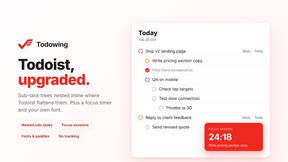
Todowing
Chrome extension that nests Todoist sub-tasks inline in Today, Upcoming, Boards, Filters, and Labels, where Todoist flattens them.