

Clean Image AI-Powered Photo Cleanup
Clean Image removes text, logos, and blemishes from photos privately using AI that runs entirely in your browser.
product Details
Explore More
Alternatives
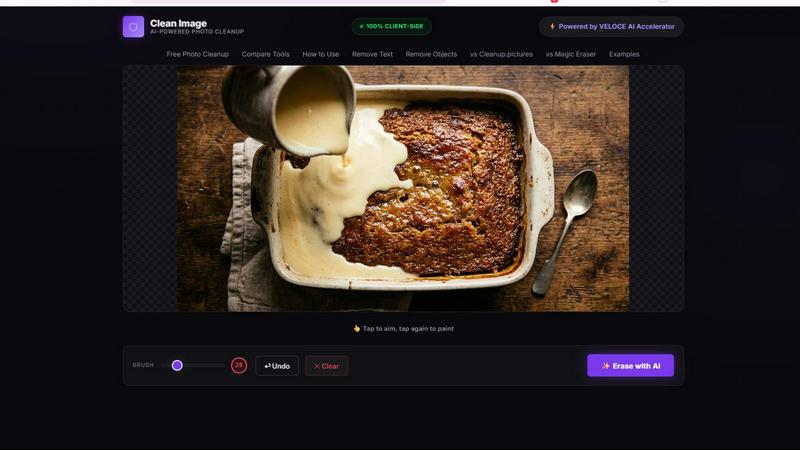
About Clean Image AI-Powered Photo Cleanup
Clean Image AI-Powered Photo Cleanup is a free, browser-based tool that leverages advanced artificial intelligence to remove unwanted elements from your photographs. Designed for users who value both efficiency and privacy, this tool allows you to erase text overlays, logos, date stamps, watermarks, and small blemishes directly within your web browser. The core value proposition of Clean Image lies in its commitment to complete client-side processing. Unlike traditional image editing services that require uploading your files to external servers, Clean Image runs entirely on your local machine. This is made possible through the integration of ONNX Runtime Web and WebAssembly, which execute a powerful AI inpainting model known as LaMa (Large Mask Inpainting) developed by OpenCV. The result is a tool that offers professional-grade photo cleanup capabilities without compromising your data security. There are no accounts to create, no subscriptions to manage, and no hidden fees. Whether you are a social media manager cleaning up product shots, a graphic designer removing branding from stock images, or a casual user fixing a personal photo, Clean Image provides a straightforward and effective solution. It is particularly effective on images with clean backgrounds where the unwanted elements, such as text or small objects, are clearly distinguishable from the main subject.
Features
100% Client-Side Privacy
This feature ensures that your images never leave your device. All processing, from the initial analysis to the final reconstruction, is performed locally within your browser using ONNX Runtime Web and WebAssembly. This eliminates any risk of your data being stored, analyzed, or misused on external servers. For professionals handling sensitive or proprietary visual content, this privacy-first architecture is a critical advantage, guaranteeing complete confidentiality for every image you edit.
AI Inpainting with LaMa Model
At the heart of Clean Image is the OpenCV LaMa neural network, a state-of-the-art inpainting model. When you brush over an area you wish to remove, the AI analyzes the surrounding pixels and intelligently reconstructs the masked region. This process is not a simple blur or clone stamp; it is a contextual generation that fills in gaps with plausible textures, patterns, and colors. This makes it exceptionally effective for removing text, logos, and date stamps that sit on top of uniform or clean backgrounds.
Instant Performance After First Load
Clean Image is designed for efficiency. The first time you use the tool, the AI model, which is approximately 89 MB in size, is downloaded and cached in your browser. On all subsequent visits, the model loads instantly from the cache with zero additional data usage. This means that after the initial setup, you can process images as quickly as your browser can render them, providing a seamless and responsive user experience without the wait times associated with server-based tools.
Simple Brush and Erase Workflow
The user interface is built around a simple, two-step process. You first use a brush tool to paint over the unwanted element in your image, such as a text overlay, logo, or blemish. Once you have made your selection, you simply click the "Erase" button. The AI then processes your selection and removes the marked area, reconstructing the background in a matter of seconds. This intuitive workflow eliminates the need for complex layer masks, selection tools, or learning curves, making professional-grade cleanup accessible to anyone.
Use Cases
Removing Text Overlays from Screenshots
Content creators and educators often need to remove text annotations, callouts, or timestamps from screenshots for reuse in presentations or tutorials. Clean Image excels at this task. By brushing over the text, the AI can seamlessly reconstruct the underlying interface or background, leaving a clean, text-free image that looks original and professional. This is far faster than manually editing pixels in a traditional photo editor.
Erasing Logos and Branding from Stock Photos
Marketers and designers frequently work with stock photography that contains watermarks or branding. Clean Image provides a legal and efficient way to remove these elements for mockups or internal use. The tool is particularly effective when the logo is placed on a clean, uniform background like a solid color wall or a gradient. This allows for rapid prototyping and visual exploration without the distraction of persistent branding.
Cleaning Date Stamps from Personal Photos
Many older digital cameras and smartphones automatically imprint date stamps on photos. Clean Image can remove these stamps to modernize the image or prepare it for printing. The AI's ability to analyze surrounding textures means it can often reconstruct the sky, grass, or other background elements that were partially obscured by the date, restoring the photo to its original, unmarked state.
Removing Small Unwanted Objects from Product Images
E-commerce professionals can use Clean Image to tidy up product photography by removing small blemishes, dust spots, or minor imperfections from backgrounds. For example, a small piece of lint on a dark shirt or a stray leaf on a clean studio floor can be quickly brushed away. The AI fills in the space with the correct background texture, ensuring the final product image is clean, professional, and ready for listing.
Frequently Asked Questions
What types of images does Clean Image work best on?
Clean Image achieves the best results on images with clean, uniform backgrounds, such as solid colors, gradients, or simple textures. It is highly effective at removing text, logos, date stamps, and small blemishes that are clearly separated from the main subject. Images with complex, busy, or highly detailed backgrounds may produce less predictable results, as the AI may struggle to reconstruct the intricate patterns.
Is my data safe when using Clean Image?
Yes, your data is completely safe. Clean Image is a 100% client-side application. All image processing is performed locally in your browser using ONNX Runtime Web and WebAssembly. Your images are never uploaded to any external server, stored, or transmitted over the internet. This ensures that your privacy is fully protected, and no one else has access to the visual data you are editing.
Do I need to create an account or pay for a subscription?
No, you do not. Clean Image is completely free to use and requires no account creation and no subscription. You can access the tool directly from your browser and start editing images immediately. There are no hidden fees, premium tiers, or usage limits. The tool is supported by its underlying technology and offered as a free utility for personal and commercial projects.
Can I use Clean Image for commercial projects?
Yes, you can use Clean Image for both personal and commercial projects. The tool is provided without any restrictions on the type of work you can produce with it. This makes it a valuable resource for freelancers, small businesses, and marketing teams who need a quick and private solution for cleaning up images without licensing concerns or recurring costs.
Similar to Clean Image AI-Powered Photo Cleanup
AIPetGen
AIPetGen turns a photo of your dog, cat, or other pet, or a written description, into a new picture or a short animation.

Chatit Me - Free Random Chat Alternative
Chat with random strangers online for free on ChatIt.me. Enjoy safe, anonymous, and instant 1-on-1 conversations with people worldwide

Video2URL
Turn videos, images, and files into secure direct links for sharing, embedding, and automated workflows.
VidhyaGen
Fast, free, and privacy-focused online tool to convert image formats instantly without losing quality. Built for web users and creators.

Presentation Intelligence
AI-native presentation and visual content platform that turns prompts, documents, images, videos, and data into polished, shareable decks.
AnimeWall
Free AI anime wallpaper generator. Create original HD anime wallpapers and avatars from text prompts.

Screen Beaver
Create product videos manually or let your AI agent control Screen Beaver through MCP—no mouse or keyboard needed.
