
ytskim
ytskim uses AI to transcribe and summarize YouTube videos, saving you time on content review and note-taking.
product Details
Explore More
Alternatives
About ytskim
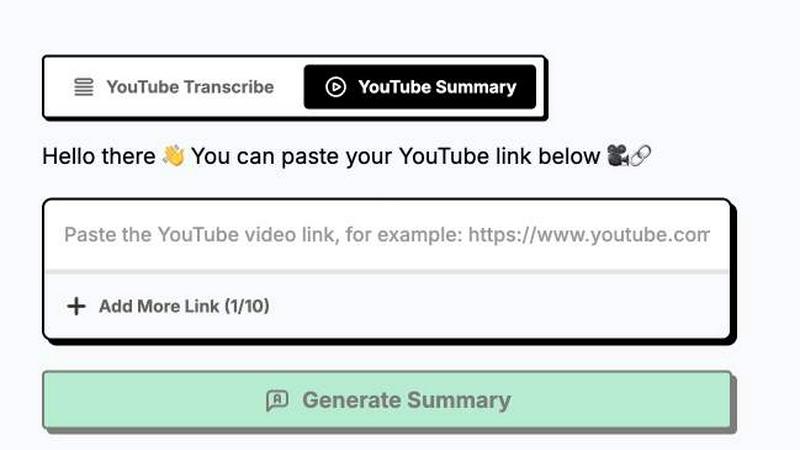
ytskim is a specialized AI-powered tool designed to extract accurate transcripts and generate structured summaries from any YouTube video within seconds. This product addresses a critical need for content creators, researchers, students, and professionals who regularly consume video content and require quick access to written text and condensed information. By leveraging advanced speech recognition and natural language processing technologies, ytskim eliminates the time-consuming process of manually transcribing videos or watching lengthy content to extract key points. The tool works seamlessly with any public YouTube video, processing both audio and visual elements to deliver precise transcriptions that capture every spoken word with high accuracy. Beyond simple transcription, ytskim employs intelligent summarization algorithms that analyze the full transcript to identify main themes, important arguments, and critical data points, then compiles this information into a well-structured, easy-to-read summary. This dual functionality makes ytskim an invaluable resource for anyone needing to quickly grasp the essence of video content without dedicating hours to watching. The product is particularly useful for professionals conducting market research, students studying lecture materials, journalists fact-checking video sources, and content creators repurposing video content into written formats. ytskim streamlines the workflow from video consumption to actionable written content, saving users significant time and effort while ensuring they never miss important details embedded in video presentations, tutorials, interviews, or educational content.
Features
High Accuracy Speech Recognition
ytskim utilizes state-of-the-art speech recognition models that achieve exceptional accuracy across diverse accents, speaking speeds, and audio qualities. The system processes audio tracks from YouTube videos with advanced noise reduction and voice isolation techniques, ensuring that even videos recorded in suboptimal conditions produce clean, readable transcripts. This feature supports multiple languages and can distinguish between different speakers in multi-person conversations, labeling each speaker appropriately in the transcript output. The accuracy rate consistently exceeds 95 percent for clear audio sources, making ytskim reliable for professional documentation and research purposes.
Intelligent Structured Summarization
Beyond basic transcription, ytskim applies sophisticated natural language processing algorithms to analyze the full transcript and generate structured summaries that capture the video's essential content. The summarization engine identifies key topics, main arguments, supporting evidence, and conclusions, then organizes this information into a logical, hierarchical format with clear headings and bullet points. Users can choose between different summary lengths and styles, from concise bullet-point overviews to more detailed paragraph-based summaries that preserve important context and nuance. This feature transforms hour-long videos into digestible written content that can be read in minutes.
Instant Processing and Export
ytskim delivers transcripts and summaries in seconds after a user provides a YouTube video link. The processing pipeline operates in parallel, simultaneously generating the transcript and analyzing it for summarization, which dramatically reduces wait times compared to sequential processing methods. Once complete, users can export their results in multiple formats including plain text, Markdown, PDF, and SRT subtitle files. The export functionality supports direct copying to clipboard, file downloads, and integration with popular note-taking and documentation platforms, making it easy to incorporate extracted content into existing workflows.
Speaker Identification and Timestamp Mapping
For videos with multiple participants, ytskim automatically detects and labels different speakers throughout the transcript, clearly indicating who said what during the conversation. Each line of the transcript is also mapped to its corresponding timestamp in the original video, allowing users to quickly jump to specific moments for verification or deeper analysis. The timestamp feature is especially valuable for researchers and fact-checkers who need to reference exact video segments. Users can click on any timestamp in the transcript to open the YouTube video at that precise moment, creating a seamless bridge between written text and visual content.
Use Cases
Academic Research and Study
Students and researchers can use ytskim to quickly transcribe and summarize lecture videos, conference presentations, and academic talks posted on YouTube. Instead of spending hours watching recorded classes or seminars, users can obtain complete transcripts for note-taking and reference, while the structured summaries highlight the most important concepts and findings. This capability is particularly valuable for non-native language speakers who benefit from having written text to review alongside video content, and for researchers conducting literature reviews that include video-based sources.
Content Repurposing for Creators
Content creators and marketers can leverage ytskim to transform their YouTube videos into written blog posts, social media captions, newsletter content, and SEO-optimized articles. The accurate transcript provides raw material for written content, while the structured summary helps identify the most quotable and shareable segments. This workflow enables creators to maximize the value of each piece of content they produce, reaching audiences who prefer reading over watching video and improving their overall content marketing strategy with minimal additional effort.
Professional Meeting and Interview Analysis
Business professionals conducting market research, competitive analysis, or candidate interviews can use ytskim to process recorded meetings, webinars, and interviews available on YouTube. The tool provides searchable transcripts that make it easy to find specific topics or statements, while summaries help team members quickly understand the key takeaways without watching entire recordings. This application is particularly useful for distributed teams where members may need to catch up on recorded presentations or for analysts monitoring industry thought leaders and competitors.
Accessibility and Language Learning
Individuals with hearing impairments or those learning a new language can benefit significantly from ytskim's transcription capabilities. The accurate transcripts provide accessible text versions of video content that can be read alongside or instead of watching, while the structured summaries help learners focus on key vocabulary and concepts. Language learners can use the transcripts to study natural speech patterns, idiomatic expressions, and pronunciation, pausing and replaying specific segments while following along with the written text to improve comprehension and retention.
Frequently Asked Questions
How accurate are the transcripts generated by ytskim?
ytskim achieves over 95 percent accuracy for videos with clear audio and standard speech patterns. Accuracy can vary depending on factors such as background noise, speaker accents, speech speed, and audio quality. The system continuously improves through machine learning updates and handles multiple languages with varying levels of precision. For critical applications, users can review and edit transcripts directly within the platform before export.
Can I process private or unlisted YouTube videos with ytskim?
ytskim can process any YouTube video that is publicly accessible via a standard URL, including unlisted videos that are not indexed in search results. However, the tool cannot access private videos that require specific account permissions or login credentials to view. Users must ensure they have the right to transcribe and summarize the content they submit, respecting copyright and privacy laws applicable in their jurisdiction.
What video lengths does ytskim support for transcription and summarization?
ytskim supports videos of any length, from short clips under one minute to multi-hour lectures and presentations. Processing time scales with video duration, but the parallel processing architecture ensures that even long videos are handled efficiently. For extremely long videos exceeding several hours, users may experience slightly extended processing times, but the system maintains accuracy and completeness throughout the entire content.
How does ytskim handle videos with multiple speakers or background noise?
ytskim incorporates advanced speaker diarization technology that can distinguish between different voices in a conversation and label them separately in the transcript. The system also uses noise reduction algorithms to minimize the impact of background sounds, music, or environmental noise on transcription accuracy. Users can review the speaker labels and make manual adjustments if needed, ensuring the final transcript accurately reflects who said what throughout the video.
Similar to ytskim
Novastart
Apps and files on an infinite canvas where people and AI agents work together.
ButterShare
ButterShare is a browser-based peer-to-peer file transfer tool that lets you send large files and folders directly between devices without signup or c
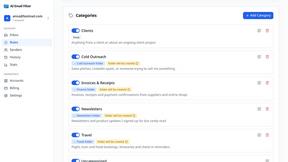
AI Email Filter
AI Email Filter sorts incoming mail into folders using plain-language prompts you write. Works with any IMAP mailbox; bring your own LLM if you want.

Product Launch Checklist
A free launch checklist for SaaS, apps, AI tools and more. Every step says why it matters and when you can skip it.
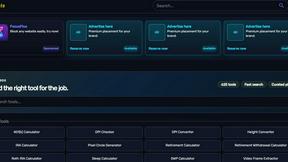
Kody Tools
Free collection of online developer utilities, code formatters, and digital converters designed to streamline your daily workflow.
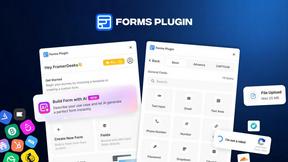
Forms Plugin
The #1 Native Form Builder Plugin for Framer - No Code, No Embeds, No External Platforms.

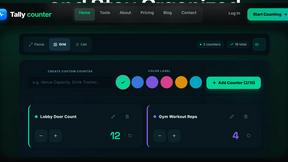
tallycounterweb.com
Tally Counter is a simple online counting tool for tracking attendance, workouts, inventory, sports scores, visitors, and everyday activities.