

xyOps
xyOps is a powerful workflow automation system that simplifies job scheduling, monitoring, and alerting for any infrastructure size.
product Details
Explore More
Alternatives
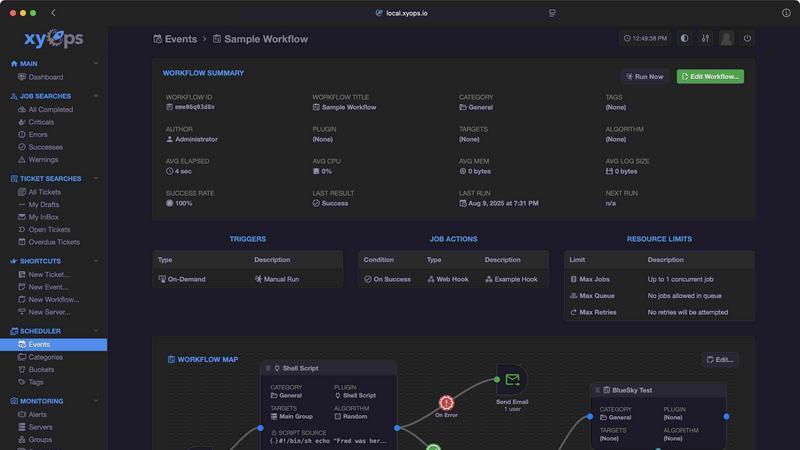
About xyOps
xyOps™ is an innovative system designed to revolutionize job scheduling, workflow automation, server monitoring, alerting, and incident response, all integrated into a single, user-friendly platform. It is specifically tailored for developers and operations teams who are seeking control over their automation stack without compromising data integrity, autonomy, or visibility. Unlike many competitors, xyOps does not conceal features behind paywalls or send telemetry data to third parties. With its open and extensible architecture, xyOps is versatile enough to run on any environment, making it an ideal solution for organizations of all sizes. By consolidating essential operational tasks into one cohesive system, xyOps empowers teams to increase productivity and streamline processes effectively.
Features
Visual Workflow Builder
The graphical workflow editor allows users to create complex automation sequences by connecting events, triggers, actions, and monitors visually. This feature enables teams to design meaningful workflows without the need for extensive coding, making automation accessible to all team members.
Flexible Job Scheduler
xyOps offers a powerful job scheduler that can target individual servers or groups. Users can create multiple schedules for each event, implement blackout ranges for holidays, and even import crontab configurations. This flexibility ensures that jobs are executed at the right time, tailored to the specific needs of the organization.
Active Job Tracking
Monitor multiple jobs running in parallel with real-time progress updates and time estimates. The system allows for the enforcement of limits on CPU and memory usage per job, ensuring optimal resource allocation. Users can also trigger custom actions based on job results, enhancing responsiveness and operational efficiency.
Integrated Ticketing System
The built-in ticketing system streamlines incident response by automatically generating tickets from alerts and failed jobs. Each ticket can include attachments and run associated jobs for CI/CD processes, providing an efficient way to manage incidents while maintaining complete visibility and control over the workflow.
Use Cases
Automated Backup Processes
Organizations can utilize xyOps to automate their backup processes across multiple servers. By setting up scheduled jobs that run during off-peak hours, teams ensure that data is consistently backed up without manual intervention, reducing the risk of data loss.
Performance Monitoring and Alerts
With xyOps, teams can define custom monitoring metrics for their servers, such as CPU and memory usage. By setting up smart alerts, they can receive notifications when performance metrics exceed predefined thresholds, allowing quick action to prevent downtime.
CI/CD Integration
Developers can leverage xyOps to automate their continuous integration and deployment pipelines. By integrating the ticketing system with version control tools, teams can ensure that code changes trigger necessary jobs, such as tests and deployments, automatically.
Resource Management Across Large Fleet
For organizations managing large fleets of servers, xyOps provides the tools necessary to monitor resource allocation and server health. With features that allow for grouping servers and applying collective policies, teams can efficiently manage resources and respond to incidents promptly.
Frequently Asked Questions
What platforms does xyOps support?
xyOps is designed to be versatile and can run on various platforms including macOS, Linux, and Windows. This cross-platform compatibility ensures that teams can deploy xyOps in their preferred environments.
Is xyOps open source?
Yes, xyOps is 100% free and open source under the BSD 3-Clause license. This means that users can modify, distribute, and use the software without restrictions, ensuring maximum flexibility.
How can I customize alerts in xyOps?
xyOps includes smart alerting capabilities that allow users to define complex trigger expressions and customize notifications through email, webhooks, and other channels. This ensures that alerts are tailored to the specific needs of the teams.
Can I integrate third-party services with xyOps?
Absolutely. xyOps features a Plugin Marketplace where users can access a growing library of ready-made plugins for various services. Users can also create their own plugins in any programming language, making integrations highly customizable and flexible.
Similar to xyOps
Xeramail Temp Mail
Free temp mail and temporary email from Xeramail. Get a disposable email address instantly, no sign-up.

iHatePosting
Create once, tailor for each platform, and schedule posts across 14 social networks from one simple dashboard.

connect machine
privacy-first, AI-powered contact management platform

Wisegrid
Wisegrid helps project-driven teams manage projects, workflows, resources, and reporting in a familiar spreadsheet-style workspace with dashboards, au

Postqued
Schedule and publish social content across 10 platforms with one dashboard, API, and MCP built for teams and AI agents.

Groniz
Run your social media on autopilot with AI agents. Post & schedule to 32+ networks from Claude Code, Codex, or Console.

HubVanta AI
HubVanta AI helps creators generate images and videos with advanced AI tools for visual content workflows.

ihatepdf.cv
ihatepdf.cv is a privacy-first, browser-based PDF platform that provides an extensive suite of tools for editing, converting, compressing, organizing,