

Prompt Builder
Prompt Builder instantly creates, refines, and manages AI prompts for models like ChatGPT and Gemini in one workspace.
product Details
Explore More
Alternatives
About Prompt Builder
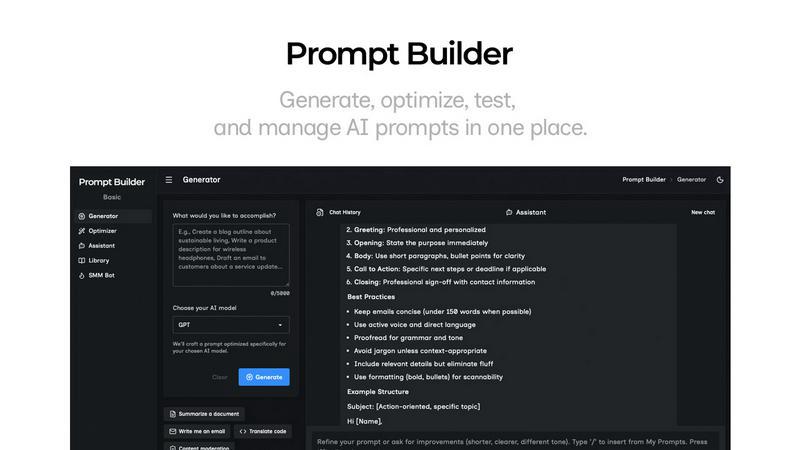
Prompt Builder is a comprehensive prompt engineering workspace designed to streamline the entire process of creating, testing, and managing AI prompts. It addresses a core challenge for professionals, creators, and developers: the inefficiency of manually crafting and rewriting prompts for different AI models. The platform's main value proposition is turning an initial idea into a ready-to-use, model-optimized prompt in seconds, not hours. It serves as a centralized hub where users can generate a first draft by describing their task in plain English, refine it through an integrated chat interface, save and organize their best versions, and execute them directly within the tool. Prompt Builder is engineered for anyone who regularly uses multiple AI models like GPT, Claude, Gemini, Llama, and others, eliminating the need to jump between different platforms and chat histories. By providing model-specific tuning, a built-in testing assistant, and a reusable library, it empowers users to stop rewriting prompts and start achieving consistent, high-quality results faster.
Features
Prompt Generator
The Prompt Generator is the core starting point for creating new prompts. Users simply describe their task or idea in natural language and select their target AI model, such as Gemini, Claude, or GPT. The tool then generates a professional-grade, model-optimized prompt draft. This initial prompt is not generic; it is specifically tuned to the structural preferences and capabilities of the chosen model. From there, users can immediately enter a refinement chat to iterate on the draft, save successful versions to their personal Library, and pin the best iterations for quick access, creating a seamless workflow from idea to execution.
Prompt Assistant
The integrated Prompt Assistant allows users to test and run their prompts without ever leaving the Prompt Builder environment. It features a model selector to run prompts with various AI assistants like Grok, Gemini, GPT, and DeepSeek. Users can insert prompts directly from the Generator, Optimizer, or their Library into a new chat session. This feature consolidates the testing phase, enabling rapid iteration with follow-up questions and keeping all context organized in one chat-first workspace. The best outputs and conversation threads can be saved and pinned, preventing the loss of valuable versions across disparate chat platforms.
Prompt Optimizer
For users with an existing prompt that needs improvement, the Prompt Optimizer provides an intelligent upgrade path. By pasting any prompt or selecting one from the Library, the tool analyzes and enhances it. It offers structured improvements across key areas like overall clarity, added constraints, refined output formats, and the inclusion of examples. Each optimization is saved in a history log, and favorite versions can be pinned. A one-click "Run in Assistant" function lets users immediately test the newly optimized prompt, closing the loop between refinement and validation in seconds.
Prompt Library & SMM Bot
The Prompt Library acts as a centralized repository for all prompts. It includes both a user's private collection ("My Prompts") and a community-driven section of templates. Prompts can be searched, filtered by category and model, and easily edited or deleted. Additionally, the specialized SMM Bot feature transforms content briefs into platform-ready social media posts. It generates tailored content for X, LinkedIn, Instagram, and others with specific tones, audience presets, and options for threads or carousels. Like all prompts, the best social post generators can be saved to the Library for consistent, reusable branding and content creation.
Use Cases
Content Creation and Marketing
Marketing professionals and content creators can use Prompt Builder to rapidly generate high-quality drafts for blog posts, ad copy, email campaigns, and especially social media content via the SMM Bot. By creating model-optimized prompts for ideation, outlining, and drafting, teams can maintain a consistent brand voice across all channels while drastically reducing the time spent on initial content creation. The Library allows them to save and reuse proven prompt templates for recurring content types.
Software Development and Technical Writing
Developers and technical writers can leverage the tool to generate, explain, or debug code snippets across different programming languages. By tuning prompts for models skilled in code generation (like Claude or GPT), they can get more accurate and usable outputs. The Optimizer helps refine complex technical queries for clarity, and the Assistant allows for interactive debugging sessions. Saved prompts for common tasks, such as writing API documentation or creating SQL queries, become valuable reusable assets.
Research and Data Analysis
Researchers, analysts, and students can utilize Prompt Builder to formulate precise questions for literature reviews, data interpretation, and hypothesis generation. The ability to tailor a prompt for a model like Perplexity (geared for research) or Gemini ensures more relevant and comprehensive answers. The chat refinement workspace is ideal for exploring a topic iteratively, while the Library helps organize research queries by project, ensuring methodology consistency across long-term studies.
Business Process Automation
Business professionals and entrepreneurs can automate repetitive communication and analysis tasks. This includes generating standardized reports, crafting personalized customer service responses, analyzing market trends from provided data, or creating meeting agendas. Prompt Builder's model-specific tuning ensures these business-critical communications are clear and effective. Saved prompt templates in the Library enable entire teams to standardize processes, improving efficiency and output quality across departments.
Frequently Asked Questions
What AI models does Prompt Builder work with?
Prompt Builder is designed to be model-agnostic and works with a wide range of popular and cutting-edge AI models. This includes OpenAI's GPT series, Anthropic's Claude, Google's Gemini, Meta's Llama, Mistral AI, DeepSeek, xAI's Grok, Perplexity, and Cohere. The Prompt Generator tailors your prompt's structure and constraints specifically for the model you select to maximize output quality.
How does the free plan work?
The free plan offers full access to the Prompt Builder workspace, including the Generator, Optimizer, and Library. It includes 25 Assistant requests per month, allowing you to test and run your prompts within the platform using various AI models at no cost. This plan does not require a credit card to start, enabling users to explore the core functionality and workflow before committing to a paid tier.
Can I use my own API keys with Prompt Builder?
The provided context focuses on using the built-in Assistant within the Prompt Builder platform. For specific details on integrating external API keys, users should consult the official Prompt Builder documentation or support channels, as this capability can depend on the specific subscription plan and platform features offered.
How does the Prompt Library work?
The Prompt Library is your personal and collaborative repository. Your "My Prompts" section stores every prompt you generate, optimize, or save from chats, which you can organize, search, and edit. The "Community Prompts" section allows you to explore and import templates shared by other users. You can run any saved prompt directly in the Assistant as a new chat, making your best work instantly reusable for any project.
Similar to Prompt Builder

WidgIq
Provide an AI-powered customer support widget for your website

Screen Issues
Free Online Screen Test Tool - Instantly diagnose dead pixels, lines, color issues, and flickering. Multiple test modes, no download needed.



ContextBolt SEO
Research keywords, competitors, backlinks and AI visibility in Claude or Codex. Keep the findings in your SEO dashboard.