

KPI Studio
KPI Studio turns raw numbers into polished, animated video charts in under 60 seconds without any design or motion graphics skills.
product Details
Explore More
Alternatives
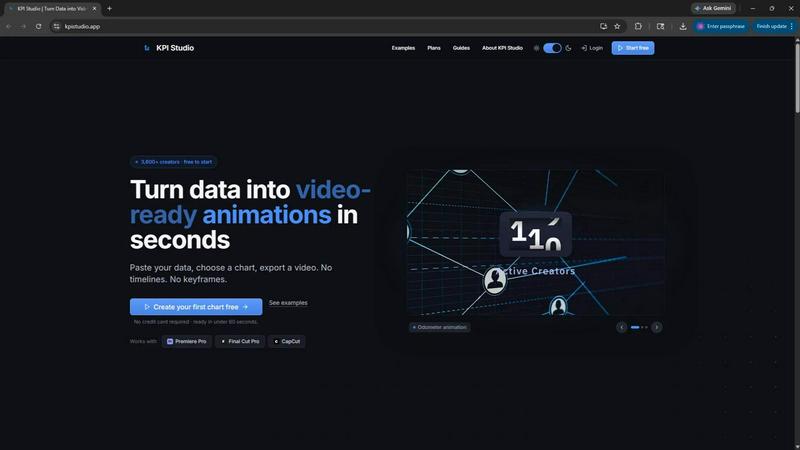
About KPI Studio
KPI Studio is a specialized software tool designed for data-driven video creators who need to incorporate animated charts and metrics into their content but lack the time or expertise for traditional motion design. The platform solves a fundamental problem in modern video production: translating raw data into engaging, professional-looking visual animations quickly and reliably. Instead of resorting to amateur screenshots, inflexible Canva templates, time-consuming After Effects workflows, or expensive freelancers, KPI Studio offers a streamlined alternative. Users simply paste their data, select a chart type, and export a fully animated, video-ready visual in under 60 seconds. There are no timelines to manage, no keyframes to set, and no complex setup procedures. The tool is built for creators operating on a publish schedule who need a chart ready the same day. Exports include transparent background support for formats like MOV, allowing charts to be dropped directly into editing timelines such as Premiere Pro, Final Cut Pro, and CapCut without any additional editing. For advanced workflows, JSON export enables deeper customization and integration into custom production pipelines. KPI Studio is used by over 3,600 creators and offers a free tier to get started, making professional data animation accessible to everyone from solo YouTubers to large production teams.
Features
One-Click Data to Animation
The core feature of KPI Studio is its ability to transform raw data into a polished, animated video in under one minute. Users simply paste their numerical data into the interface, choose from a selection of chart types like count-up counters, growing bar charts, or drawing line charts, and the software automatically generates a fully animated visual. This eliminates the need for any manual animation work, keyframe adjustments, or timeline editing. The process is designed to be repeatable and fast, allowing creators to update numbers and re-export in seconds without redoing any work. This feature is the foundation of the product's value proposition, saving hours of production time for every single chart needed in a video.
Video-Ready Export Formats
KPI Studio provides a comprehensive range of export options tailored specifically for video editing workflows. Users can export their animated charts as MP4, GIF, MOV with transparency, or PNG sequences. The transparent background support in MOV and GIF alpha formats is particularly critical, as it allows charts to be placed directly over existing video footage or backgrounds within editing software like Premiere Pro, Final Cut Pro, and CapCut without any additional compositing or keying. The tool also supports multiple aspect ratios including 16:9 widescreen, 1:1 square, 9:16 stories, and 4:3 standard, ensuring the output fits perfectly into any platform from YouTube to TikTok to Instagram.
Real-Time Preview and Customization
Before exporting, users can see their animated chart come to life in a real-time preview window. This allows for immediate visual feedback and quick iterations on chart style, colors, animation speed, and data representation. The customization options are designed to be intuitive and non-technical, enabling creators to match the chart's appearance to their brand guidelines or video aesthetic without needing design skills. Changing a color or adjusting an animation curve is as simple as clicking a button, and the preview updates instantly. This feature ensures that the final export is exactly what the creator envisions, reducing the need for trial-and-error exports and saving even more time.
JSON Export for Advanced Pipelines
For users with more complex production workflows, KPI Studio offers JSON export functionality. This feature allows the chart data, animation parameters, and styling information to be exported as a structured JSON file. This file can then be imported into advanced animation tools like After Effects, or used in custom software pipelines for further editing, data binding, or integration with other systems. This bridges the gap between the simplicity of KPI Studio and the power of professional motion graphics tools, giving advanced users the flexibility to take their animations to the next level while still benefiting from the initial rapid creation process.
Use Cases
YouTube and Social Media Content Creation
Video creators on platforms like YouTube, Instagram, and TikTok frequently use data to support their narratives, whether it is showing subscriber growth, revenue milestones, or comparative statistics. KPI Studio allows these creators to generate professional, animated charts in seconds that can be dropped directly into their editing timeline. The transparent background exports ensure the charts blend seamlessly with the video content, while the 9:16 aspect ratio option is perfect for Stories and Shorts. This eliminates the need for static screenshots or hiring a motion designer for a simple metric reveal, helping creators maintain a consistent publishing schedule with high-quality visuals.
Business Presentations and Reporting
Professionals who create presentations for internal meetings, client pitches, or quarterly reports can use KPI Studio to animate their key performance indicators. Instead of showing static slides with numbers, they can embed animated count-up counters or growing bar charts directly into PowerPoint or Google Slides. The animated visuals capture audience attention more effectively than static data, improving message retention and engagement. The ability to update data quickly by re-pasting new numbers and re-exporting makes it ideal for recurring reports where metrics change frequently, such as weekly sales figures or monthly user growth.
eLearning and Educational Videos
Educators and instructional designers often need to present data in a clear, engaging manner for online courses or training videos. KPI Studio enables them to create animated charts that illustrate concepts like population growth, financial trends, or scientific measurements. The self-drawing line chart feature is particularly useful for showing how a metric changes over time, making abstract data more concrete and memorable for learners. The simple workflow means educators can focus on content creation rather than technical animation skills, and the various export formats ensure compatibility with most eLearning platforms and video editing software.
Client Deliverables and Agency Work
Marketing agencies and freelance video editors frequently produce content for multiple clients, each with their own data sets and branding requirements. KPI Studio streamlines this process by allowing rapid creation of branded, animated charts for client projects. The one-time Creator Pack pricing model is well-suited for project-based work, where a freelancer might need a set number of exports for a specific client video without committing to a monthly subscription. The ability to customize colors and styles ensures each client's chart aligns with their brand identity. The fast turnaround time also allows agencies to iterate quickly on client feedback, making changes and re-exporting in minutes rather than hours.
Pricing
KPI Studio offers a simple and transparent pricing structure with three main options to suit different usage levels. The Free plan is available at no cost and includes unlimited PNG exports, 3 free animated exports, access to all chart types, and a real-time preview. This allows users to try the tool on their next video without providing a credit card. For users who need occasional animated exports, the Creator Pack is a one-time purchase for $11.99. It includes everything in the Free plan plus 10 video exports in GIF, MP4, WebM, and MOV formats, no watermark, and 1080p export resolution. The credits never expire. For creators who publish every week, the Pro plan is the most popular option at $19.99 per month. It includes everything in the Free plan with unlimited video exports in all formats, no watermark, 4K export resolution, and the ability to cancel anytime.
Frequently Asked Questions
What file formats can I export from KPI Studio?
KPI Studio offers a wide range of export formats to suit different video editing and presentation needs. You can export your animated charts as MP4 video files for standard use, GIF files for lightweight animations, MOV files with transparency for direct overlay in editing software, and PNG image sequences. The transparent background support is available for both MOV and GIF formats, which is essential for placing charts over existing video footage without any background. All exports are available in multiple aspect ratios including 16:9, 1:1, 9:16, and 4:3.
Do I need any design or animation skills to use KPI Studio?
No, KPI Studio is specifically designed for users without any motion design or animation experience. The entire workflow is built around simplicity: paste your data, choose a chart type, customize the appearance using intuitive controls, and export. There are no timelines to manage, no keyframes to set, and no complex software to learn. The real-time preview allows you to see exactly what your chart will look like before exporting, and making changes is as simple as clicking a button. The tool is built for data-driven creators who need results fast, not for professional animators.
Can I update the data in my chart after exporting?
Yes, updating your data is one of the key strengths of KPI Studio. If your numbers change, you simply return to the tool, paste the new data into the same chart configuration, and re-export. There is no need to redo any animation work or re-apply customizations. The tool remembers your chart style, colors, and settings, so updating is a matter of seconds. This is particularly valuable for creators who need to produce recurring content with changing metrics, such as weekly growth reports or monthly performance reviews.
What video editing software is compatible with KPI Studio exports?
KPI Studio exports are designed to be compatible with all major video editing software. The transparent MOV files work seamlessly with Premiere Pro, Final Cut Pro, and CapCut. The MP4 and GIF files are universally supported across all editing platforms. The various aspect ratios ensure that your charts fit perfectly into projects destined for YouTube, Instagram, TikTok, or any other platform. Additionally, the exports can be used in presentation software like PowerPoint and Google Slides, making the tool versatile for both video and static presentation workflows.
Similar to KPI Studio

LinkedIn Translator
Turn rough notes into credible LinkedIn writing or decode professional jargon.

Seedance 2.5 AI Video Generator
Seedance 2.5 is a multimodal AI video generator for cinematic 30-second videos with high-fidelity reference control and AI video editing.
VideoToScript
Turn TikTok, Reels, Shorts, Facebook videos, audio, and video into accurate timestamped transcripts with TXT, SRT, and VTT exports.

Artaivo
Create AI videos, images, avatars, and audio in one creative workspace.


UGCad AI
AI UGC video ad Generator which Turn a URL, prompt, or template into a ready video ads.
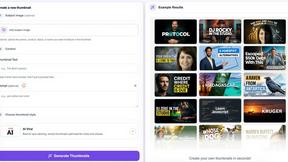
StopScroll
AI YouTube thumbnail maker that helps creators generate high-click thumbnails faster.