

HomeDesignsAI
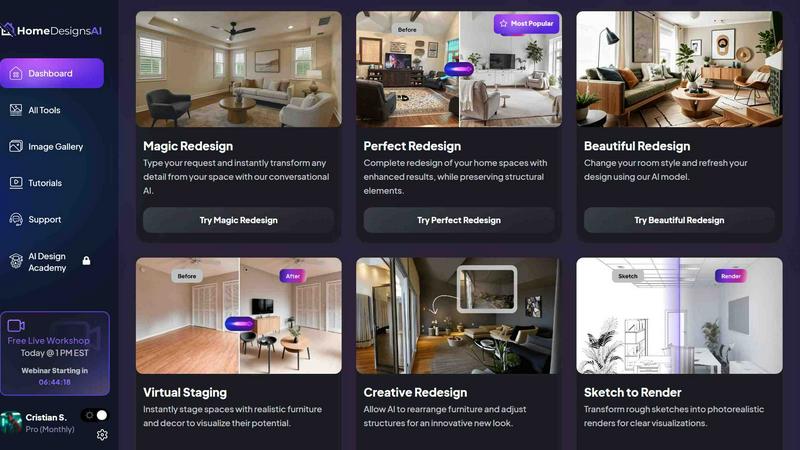
HomeDesignsAI instantly transforms any home interior, exterior, or garden from a single photo using powerful AI.
product Details
Explore More
Alternatives
About HomeDesignsAI
HomeDesignsAI is an advanced, AI-powered home design platform that revolutionizes how homeowners, professionals, and businesses visualize and transform interior, exterior, and garden spaces. The product enables users to upload a single photo of any room, building facade, or landscape and receive photorealistic redesigns in under 30 seconds. With an extensive library of over 200 design styles including Scandinavian, Japandi, Modern Farmhouse, Bohemian, Quiet Luxury, Mediterranean, and Industrial, alongside support for more than 120 space types from living rooms and bathrooms to outdoor kitchens, hotel lobbies, and Airbnb units, HomeDesignsAI eliminates the need for any prior design skills or software expertise. The platform serves a diverse global audience of over 2.64 million users across 170 countries, including real estate agents, interior designers, landscapers, home builders, architects, and individual homeowners. Trusted by over 70,000 professionals who have completed more than 7.68 million projects, HomeDesignsAI stands as the world’s leading AI home design tool. Its core value proposition lies in democratizing professional-grade design: anyone can instantly reimagine, furnish, and customize any space using intuitive controls, AI-driven suggestions, and a comprehensive set of features like texture swapping, color and material customization, weather changes, and automatic furnishing for empty rooms. Beyond individual use, the platform offers a scalable API for businesses seeking to integrate AI design capabilities into their own workflows, making it a versatile solution for personal, professional, and enterprise applications.
Features
Extensive Style and Space Library
HomeDesignsAI provides access to over 200 distinct design styles and more than 120 space types, covering virtually every aesthetic preference and room category. Users can explore styles ranging from Scandinavian minimalism and Japandi fusion to Modern Farmhouse warmth, Bohemian eclecticism, Quiet Luxury sophistication, Mediterranean charm, and Industrial edge. The space library includes interiors like living rooms, kitchens, bathrooms, bedrooms, and home offices, as well as exteriors such as facades, patios, terraces, and gardens. This vast selection ensures that any design vision, from a cozy residential update to a commercial hotel lobby or Airbnb unit, can be realized with a few clicks.
Interior, Exterior, and Garden Redesign
Unlike many tools that focus solely on interiors, HomeDesignsAI offers comprehensive redesign capabilities for interiors, exteriors, and gardens from a single platform. Users can upload a photo of their living room, a house facade, or a backyard and instantly apply new styles, colors, materials, and furnishings. The platform supports outdoor kitchens, patios, terraces, and landscaping, making it equally valuable for homeowners planning curb appeal upgrades, landscapers designing gardens, and real estate professionals staging entire properties. This all-in-one approach eliminates the need for multiple specialized tools.
Fill The Room Auto-Furnishing
The Fill The Room feature is a powerful virtual staging tool that automatically furnishes empty or sparsely decorated spaces. Users can upload a photo of a vacant room, and the AI intelligently places furniture, decor, and accessories to create a fully furnished, photorealistic design. This is ideal for real estate agents listing empty properties, home stagers preparing homes for sale, and homeowners looking to visualize how furniture might fit into a new space. The feature saves significant time and cost compared to traditional staging or manual design software.
Custom AI Instructions and Adjustable Intervention Levels
HomeDesignsAI empowers users with granular control over the AI design process through custom instructions and adjustable intervention levels. Users can input specific design preferences, such as "use warm neutral tones with a mid-century modern sofa" or "keep the existing window treatments," and the AI incorporates these directives into the output. The adjustable intervention level allows users to set how much creative freedom the AI has, ranging from conservative edits that closely follow the original photo to more transformative redesigns. This flexibility ensures that both beginners and experienced designers can achieve their desired results.
Use Cases
Real Estate Virtual Staging and Marketing
Real estate agents and property managers use HomeDesignsAI to virtually stage vacant or outdated properties, creating appealing, furnished interiors and exteriors for online listings. By uploading a photo of an empty room, agents can instantly add furniture, decor, and modern finishes that help potential buyers visualize the space’s potential. This accelerates sales, reduces the need for physical staging, and allows agents to showcase multiple design styles for the same property, increasing buyer interest and engagement across listings.
Homeowner Renovation Planning
Homeowners planning renovations use HomeDesignsAI to experiment with different design styles, color schemes, and material choices before committing to costly changes. For example, a homeowner can upload a photo of their kitchen and test various cabinet colors, countertop materials, and backsplash patterns in under 30 seconds. This enables informed decision-making, reduces the risk of expensive mistakes, and provides a clear visual blueprint to share with contractors, designers, and family members during the planning process.
Interior Designer Client Presentations
Professional interior designers leverage HomeDesignsAI to quickly generate multiple design concepts for client presentations. Instead of spending hours creating manual renders or mood boards, designers can upload client photos and instantly produce photorealistic versions in different styles, such as Scandinavian, Japandi, or Modern Farmhouse. The adjustable intervention level allows designers to fine-tune AI outputs to match their creative vision, while the custom AI instructions ensure client-specific preferences are incorporated. This streamlines the design process and enhances client communication.
Landscaping and Garden Design
Landscapers and homeowners use HomeDesignsAI to redesign outdoor spaces, including gardens, patios, terraces, and backyards. Users can upload a photo of their current landscape and apply new planting schemes, hardscaping materials, outdoor furniture, and even weather changes to visualize seasonal effects. This is particularly useful for landscaping professionals presenting proposals to clients, as well as homeowners planning garden renovations, pool installations, or outdoor entertainment areas. The platform’s ability to handle exteriors and gardens makes it a comprehensive tool for all property types.
Frequently Asked Questions
How do I get started with HomeDesignsAI?
To get started, simply visit the HomeDesignsAI website and create an account. Once logged in, upload a clear photo of the space you want to redesign, such as a living room, exterior facade, or garden. Then, choose your preferred design style from the library of over 200 options, set any custom instructions or preferences, and click generate. The AI will produce a photorealistic redesign in under 30 seconds. You can then further customize the result by changing colors, textures, or materials, or use the Fill The Room feature for empty spaces.
What types of spaces and styles are supported?
HomeDesignsAI supports over 120 space types, including interiors like living rooms, kitchens, bathrooms, bedrooms, home offices, and basements, as well as exteriors such as house facades, patios, terraces, and gardens. The platform also covers commercial spaces like hotel lobbies, restaurants, and Airbnb units. For styles, users can choose from over 200 options, including Scandinavian, Japandi, Modern Farmhouse, Bohemian, Quiet Luxury, Mediterranean, Industrial, Mid-Century Modern, Coastal, and many more. Custom styles are available upon request for professional users.
Can I use HomeDesignsAI for commercial or business purposes?
Yes, HomeDesignsAI is designed for both personal and professional use. Real estate agents, interior designers, landscapers, home builders, architects, and property managers use the platform for client work, marketing, and project planning. The platform offers a scalable API for businesses that want to integrate AI design capabilities into their own applications or workflows. Professional users can also access advanced features like custom AI instructions, adjustable intervention levels, and the ability to generate designs with furniture and decor shopping links for client purchases.
Is any design experience required to use HomeDesignsAI?
No, HomeDesignsAI is specifically built to require zero design skills or software expertise. The platform is beginner-friendly and guides users through a simple three-step process: upload a photo, set preferences, and generate the result. The AI handles all complex design decisions, from style selection to furniture placement and material matching. Users can also adjust the AI intervention level to control how much creative freedom the tool has, making it accessible for both complete novices and experienced designers who want fine-grained control.
Similar to HomeDesignsAI

RoofReport
RoofReport lets you upload a photo of your home to instantly preview real shingle colors from top brands for free with no signup required.
archmaster
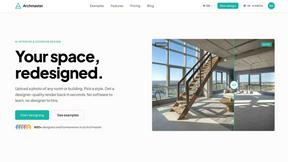
Archmaster uses AI to transform photos of any room or building into photorealistic interior and exterior designs in seconds with 20 style presets.